Scraping is fundamentally unclean
It is awkward
It is very prone to error
It is brittle
It’s often against the terms of service of websites
Server-side renderingIf the webpages you are interested in looking at are statically or dynamically assembled on the server side, they arrive in your browser “fully formed”. The tables or other data structures they may contain are actually populated with numbers.
The task is to get them out by identifying the HTML elements (e.g. <table>, <tr>, <td>, <li> etc) or the CSS styling selectors (e.g. .pagetable, .datalist, #website-content-tabledata etc) and then extract the values they enclose.
HTML elements have a fixed number of names; CSS selectors have a fixed identifying format (the . and # prefixes, etc) and internal structure, but they can be named according to the needs of the site designer.
Client-side renderingIf the webpages you are interested in looking at are assembled on the client side, then what comes down is roughly in two pieces: an empty template for the the layout of the page; and a set of instructions for pulling data separately and to fill the template.
The process of requesting specific data takes place through some private or public application programming interface or API.
An API takes well-formed requests for data and returns whatever is requested in a structured format (usually JSON or XML) that can be used by the client. So we should just talk to the API directly if we can.
Getting a single table
A single table where we know the class.
Consider this table
Private Waldorf
47.49
44.19
84.21
20
16
513
Public Montessori
17.08
12.24
54.55
5.97
11
706
Charter Montessori
14.28
10.26
31.67
4.35
5
227
Charter
10.76
3.03
70.37
0
314
19,863
Private Christian
6.74
3.70
92.86
0
333
8,763
Private Non-Specific
5.89
0
86.96
0
596
16,795
Private Montessori
4.64
0
35.71
0
98
2,101
Private Jewish or Islamic
2.59
0
14.29
0
8
237
Public
2.33
0.81
75
0
5314
472,802
Private Catholic
1.80
0
27.78
0
333
8,855
Private Christian Montessori
1.25
0
5
0
4
78
Getting a single table
It’s on my website. It’s the only table on the page, which means we can just select it with by saying we want the <table> element on the page. We use html_element() to isolate the table and html_table() to parse it to a tibble:
<- read_html ("https://kieranhealy.org/blog/archives/2015/02/03/another-look-at-the-california-vaccination-data/" )|> html_element ("table" ) |> html_table () |> :: clean_names ()
# A tibble: 11 × 7
   type                 mean_pbe median_pbe max_pbe min_pbe n_schools n_students
   <chr>                   <dbl>      <dbl>   <dbl>   <dbl>     <int> <chr>
 1 Private Waldorf         47.5       44.2     84.2   20           16 513
 2 Public Montessori       17.1       12.2     54.6    5.97        11 706
 3 Charter Montessori      14.3       10.3     31.7    4.35         5 227
 4 Charter                 10.8        3.03    70.4    0          314 19,863
 5 Private Christian        6.74       3.7     92.9    0          333 8,763
 6 Private Non-Specific     5.89       0       87.0    0          596 16,795
 7 Private Montessori       4.64       0       35.7    0           98 2,101
 8 Private Jewish or I…     2.59       0       14.3    0            8 237
 9 Public                   2.33       0.81    75      0         5314 472,802
10 Private Catholic         1.8        0       27.8    0          333 8,855
11 Private Christian M…     1.25       0        5      0            4 78
When there’s more than one
Next, consider the tables on this page . Again, these are static tables, but there are several of them.
With html_element() we’ll just extract the first one:
<- read_html ("https://kieranhealy.org/blog/archives/2013/06/19/lewis-and-the-women/" )|> html_element ("table" ) |> html_table () |> :: clean_names ()
# A tibble: 24 × 4
    rank cites item                                 typically_cited_in
   <int> <int> <chr>                                <chr>
 1     1   180 Kripke S 1980 Naming Necessity       Nous, Philosophical Review
 2     2   131 Lewis D 1986 Plurality Worlds        Nous, Philosophical Review
 3     3    97 Quine W 1960 Word Object             Philosophical Review, Nous
 4     4    83 Williamson T 2000 Knowledge Limits   Nous, Philosophical Review
 5     5    82 Lewis D 1973 Counterfactuals         Mind, Nous
 6     6    78 Evans G 1982 Varieties Reference     Philosophical Review, Nous
 7     7    77 Chalmers D 1996 Conscious Mind       Philosophical Review, Nous
 8     7    77 Davidson D 1980 Essays Actions Event Philosophical Review, Mind
 9     9    73 Lewis D 1986 Philos Papers           Mind, Nous
10    10    64 Parfit D 1984 Reasons Persons        Philosophical Review, Nous
# ℹ 14 more rows
When there’s more than one
With html_elements() we’ll extract all of them:
|> html_elements ("table" )
{xml_nodeset (5)}
[1] <table>\n<thead><tr>\n<th align="left"><em>Rank</em></th>\n<th align="lef ...
[2] <table>\n<thead><tr>\n<th align="left"><em>Rank</em></th>\n<th align="lef ...
[3] <table>\n<thead><tr class="header">\n<th align="left"><em>Rank</em></th>\ ...
[4] <table>\n<thead><tr>\n<th align="left"><em>Rank</em></th>\n<th align="lef ...
[5] <table>\n<thead><tr>\n<th align="right"><em>Rank</em></th>\n<th align="ri ...
When there’s more than one
We can get the nth one with pluck():
|> html_elements ("table" ) |> pluck (2 ) |> html_table () |> :: clean_names ()
# A tibble: 33 × 4
    rank cites item                              typically_cited_in
   <int> <int> <chr>                             <chr>
 1     2   131 Lewis D 1986 Plurality Worlds     Nous, Philosophical Review
 2     5    82 Lewis D 1973 Counterfactuals      Mind, Nous
 3     9    73 Lewis D 1986 Philos Papers        Mind, Nous
 4    16    50 Lewis D 1983 Philos Papers        Nous, Mind
 5    18    48 Lewis D 1983 Australas J Philos   Nous, Mind
 6    20    44 Lewis D 1996 Australas J Philos   Nous, Philosophical Review
 7    41    36 Lewis D 1979 J Philos Logic       Nous, Mind
 8    47    34 Lewis D 1991 Parts Classes        Nous, Mind
 9    67    29 Lewis D 1969 Convention Philos St Mind, Journal of Philosophy
10    67    29 Lewis D 1986 Philos Papers        Philosophical Review, Nous
# ℹ 23 more rows
Or we can use Selector Gadget (or an equivalent dev tool) to find the CSS or XPath selector to the specific table, if we can find one.
Wikipedia tables
For a long time, Wikipedia tables were fairly straightforward to select because they were static. These days many of them have a Javascript element that makes them sortable by column, but also makes them harder to grab with a CSS selector. Getting all the table elements on a page and cleaning later is often the path of least resistance.
Wikipedia tables
<- read_html ("https://en.wikipedia.org/wiki/Demographics_of_the_Republic_of_Ireland" )|> # Get all the tables classed as `.wikitable` on the page html_elements (".wikitable" ) |> pluck (7 ) |> html_table () |> :: clean_names ()
# A tibble: 39 × 4
    year immigrants emigrants net_migration
   <int> <chr>      <chr>     <chr>
 1  1987 17.2       40.2      −23.0
 2  1988 19.2       61.1      −41.9
 3  1989 26.7       70.6      −43.9
 4  1990 33.3       56.3      −22.9
 5  1991 33.3       35.3      −2.0
 6  1992 40.7       33.4      7.4
 7  1993 34.7       35.1      −0.4
 8  1994 30.1       34.8      −4.7
 9  1995 31.2       33.1      −1.9
10  1996 39.2       31.2      8.0
# ℹ 29 more rows
Again, scraping is unclean
Scraping can be useful to quickly grab a table or two that you need from a website. For harvesting large amounts of data it is no longer a very good idea, on the whole, and may get you banned from websites if you abuse it.
Example: the NY Citibike API
NYC CitiBikes
Many cities have Bike Share programs. Many of those provide data according to the GBFS specification . A spec like this is a set of rules that says “If you adhere to this spec, you will provide data in the following consistent way”, where this includes rules about the data format and the endpoints or URLs where that data can be found.
NYC CitiBikes
The spec has a rule saying “Provide a feed specifying the data available”.
<- "https://gbfs.citibikenyc.com/gbfs/2.3/gbfs.json" <- jsonlite:: fromJSON (gbfsurl)str (feeds)
List of 4
 $ data        :List of 3
  ..$ en:List of 1
  .. ..$ feeds:'data.frame':    12 obs. of  2 variables:
  .. .. ..$ name: chr [1:12] "gbfs" "system_information" "station_information" "station_status" ...
  .. .. ..$ url : chr [1:12] "https://gbfs.lyft.com/gbfs/2.3/bkn/gbfs.json" "https://gbfs.lyft.com/gbfs/2.3/bkn/en/system_information.json" "https://gbfs.lyft.com/gbfs/2.3/bkn/en/station_information.json" "https://gbfs.lyft.com/gbfs/2.3/bkn/en/station_status.json" ...
  ..$ fr:List of 1
  .. ..$ feeds:'data.frame':    12 obs. of  2 variables:
  .. .. ..$ name: chr [1:12] "gbfs" "system_information" "station_information" "station_status" ...
  .. .. ..$ url : chr [1:12] "https://gbfs.lyft.com/gbfs/2.3/bkn/gbfs.json" "https://gbfs.lyft.com/gbfs/2.3/bkn/fr/system_information.json" "https://gbfs.lyft.com/gbfs/2.3/bkn/fr/station_information.json" "https://gbfs.lyft.com/gbfs/2.3/bkn/fr/station_status.json" ...
  ..$ es:List of 1
  .. ..$ feeds:'data.frame':    12 obs. of  2 variables:
  .. .. ..$ name: chr [1:12] "gbfs" "system_information" "station_information" "station_status" ...
  .. .. ..$ url : chr [1:12] "https://gbfs.lyft.com/gbfs/2.3/bkn/gbfs.json" "https://gbfs.lyft.com/gbfs/2.3/bkn/es/system_information.json" "https://gbfs.lyft.com/gbfs/2.3/bkn/es/station_information.json" "https://gbfs.lyft.com/gbfs/2.3/bkn/es/station_status.json" ...
 $ last_updated: int 1792499457
 $ ttl         : int 60
 $ version     : chr "2.3"
This comes in to us a nested list .
NYC CitiBikes
JSON data is typically nested. It can look really complex at first glance. This is one reason to read the spec. We can put the feed into a tibble if we like:
<- as_tibble (feeds)
# A tibble: 3 × 4
  data             last_updated   ttl version
  <named list>            <int> <int> <chr>
1 <named list [1]>   1792499457    60 2.3
2 <named list [1]>   1792499457    60 2.3
3 <named list [1]>   1792499457    60 2.3
RStudio’s object viewer is a good way to explore the hierarchical structure of unfamiliar lists.
NYC CitiBikes
If we explore or look at the spec we see that each row provides the same feed information in English, Spanish, or French. We can slice out the English feed and look at what’s in it:
|> slice (1 ) |> unnest (data) |> # It's two levels down unnest (data)
# A tibble: 12 × 5
   name                 url                           last_updated   ttl version
   <chr>                <chr>                                <int> <int> <chr>
 1 gbfs                 https://gbfs.lyft.com/gbfs/2…   1792499457    60 2.3
 2 system_information   https://gbfs.lyft.com/gbfs/2…   1792499457    60 2.3
 3 station_information  https://gbfs.lyft.com/gbfs/2…   1792499457    60 2.3
 4 station_status       https://gbfs.lyft.com/gbfs/2…   1792499457    60 2.3
 5 free_bike_status     https://gbfs.lyft.com/gbfs/2…   1792499457    60 2.3
 6 system_hours         https://gbfs.lyft.com/gbfs/2…   1792499457    60 2.3
 7 system_calendar      https://gbfs.lyft.com/gbfs/2…   1792499457    60 2.3
 8 system_regions       https://gbfs.lyft.com/gbfs/2…   1792499457    60 2.3
 9 system_pricing_plans https://gbfs.lyft.com/gbfs/2…   1792499457    60 2.3
10 system_alerts        https://gbfs.lyft.com/gbfs/2…   1792499457    60 2.3
11 gbfs_versions        https://gbfs.lyft.com/gbfs/2…   1792499457    60 2.3
12 vehicle_types        https://gbfs.lyft.com/gbfs/2…   1792499457    60 2.3
More urls! Let’s extract the station data feed.
NYC CitiBikes
<- feeds_df |> slice (1 ) |> unnest (data) |> unnest (data) |> filter (name == "station_information" ) |> pull (url)
[1] "https://gbfs.lyft.com/gbfs/2.3/bkn/en/station_information.json"
NYC CitiBikes
That was tedious. If we know precisely what we’re after we can do it faster by directly accessing the list element we want:
# Base R style 1 ]]$ en$ feeds$ url[3 ]
[1] "https://gbfs.lyft.com/gbfs/2.3/bkn/en/station_information.json"
Remember, when you explore an object in RStudio’s inspector pane, these elements will get printed to the console.
Or with pluck():
# Pluck by element number or name |> pluck (1 ,"en" , "feeds" , "url" , 3 )
[1] "https://gbfs.lyft.com/gbfs/2.3/bkn/en/station_information.json"
NYC CitiBikes
Or with some combination of methods:
|> pluck (1 ,"en" , "feeds" ) |> as_tibble ()
# A tibble: 12 × 2
   name                 url
   <chr>                <chr>
 1 gbfs                 https://gbfs.lyft.com/gbfs/2.3/bkn/gbfs.json
 2 system_information   https://gbfs.lyft.com/gbfs/2.3/bkn/en/system_informatio…
 3 station_information  https://gbfs.lyft.com/gbfs/2.3/bkn/en/station_informati…
 4 station_status       https://gbfs.lyft.com/gbfs/2.3/bkn/en/station_status.js…
 5 free_bike_status     https://gbfs.lyft.com/gbfs/2.3/bkn/en/free_bike_status.…
 6 system_hours         https://gbfs.lyft.com/gbfs/2.3/bkn/en/system_hours.json
 7 system_calendar      https://gbfs.lyft.com/gbfs/2.3/bkn/en/system_calendar.j…
 8 system_regions       https://gbfs.lyft.com/gbfs/2.3/bkn/en/system_regions.js…
 9 system_pricing_plans https://gbfs.lyft.com/gbfs/2.3/bkn/en/system_pricing_pl…
10 system_alerts        https://gbfs.lyft.com/gbfs/2.3/bkn/en/system_alerts.json
11 gbfs_versions        https://gbfs.lyft.com/gbfs/2.3/bkn/en/gbfs_versions.json
12 vehicle_types        https://gbfs.lyft.com/gbfs/2.3/bkn/en/vehicle_types.json
Then work as you would with a tibble.
NYC CitiBikes
<- feeds_df |> pluck (1 ,"en" , "feeds" ) |> filter (name == "station_status" ) |> pull (url)<- jsonlite:: fromJSON (station_status_url)str (station_status_df) # Still a list
List of 4
 $ data        :List of 1
  ..$ stations:'data.frame':    2519 obs. of  13 variables:
  .. ..$ station_id              : chr [1:2519] "2124037250266884686" "66db408f-0aca-11e7-82f6-3863bb44ef7c" "6fab98b7-b06a-49d8-a4d1-087ffce0ebcf" "563389a0-d90f-4155-9c50-528459df26aa" ...
  .. ..$ num_bikes_available     : int [1:2519] 10 30 0 16 12 8 16 5 3 5 ...
  .. ..$ num_bikes_disabled      : int [1:2519] 1 5 3 2 0 2 1 5 2 1 ...
  .. ..$ num_docks_available     : int [1:2519] 1 4 16 9 4 3 6 13 15 19 ...
  .. ..$ num_docks_disabled      : int [1:2519] 0 0 0 0 0 1 0 0 0 0 ...
  .. ..$ is_installed            : int [1:2519] 1 1 1 1 1 1 1 1 1 1 ...
  .. ..$ is_renting              : int [1:2519] 1 1 1 1 1 1 1 1 1 1 ...
  .. ..$ is_returning            : int [1:2519] 1 1 1 1 1 1 1 1 1 1 ...
  .. ..$ last_reported           : int [1:2519] 1792499321 1792499328 1792499327 1792499328 1792499328 1792499330 1792499333 1792499333 1792499334 1792499335 ...
  .. ..$ vehicle_types_available :List of 2519
  .. .. ..$ :'data.frame':  2 obs. of  2 variables:
  .. .. .. ..$ vehicle_type_id: chr [1:2] "1" "2"
  .. .. .. ..$ count          : int [1:2] 8 2
  .. .. ..$ :'data.frame':  2 obs. of  2 variables:
  .. .. .. ..$ vehicle_type_id: chr [1:2] "1" "2"
  .. .. .. ..$ count          : int [1:2] 25 5
  .. .. ..$ :'data.frame':  2 obs. of  2 variables:
  .. .. .. ..$ vehicle_type_id: chr [1:2] "1" "2"
  .. .. .. ..$ count          : int [1:2] 0 0
  .. .. ..$ :'data.frame':  2 obs. of  2 variables:
  .. .. .. ..$ vehicle_type_id: chr [1:2] "1" "2"
  .. .. .. ..$ count          : int [1:2] 16 0
  .. .. ..$ :'data.frame':  2 obs. of  2 variables:
  .. .. .. ..$ vehicle_type_id: chr [1:2] "1" "2"
  .. .. .. ..$ count          : int [1:2] 12 0
  .. .. ..$ :'data.frame':  2 obs. of  2 variables:
  .. .. .. ..$ vehicle_type_id: chr [1:2] "1" "2"
  .. .. .. ..$ count          : int [1:2] 0 8
  .. .. ..$ :'data.frame':  2 obs. of  2 variables:
  .. .. .. ..$ vehicle_type_id: chr [1:2] "1" "2"
  .. .. .. ..$ count          : int [1:2] 9 7
  .. .. ..$ :'data.frame':  2 obs. of  2 variables:
  .. .. .. ..$ vehicle_type_id: chr [1:2] "1" "2"
  .. .. .. ..$ count          : int [1:2] 1 4
  .. .. ..$ :'data.frame':  2 obs. of  2 variables:
  .. .. .. ..$ vehicle_type_id: chr [1:2] "1" "2"
  .. .. .. ..$ count          : int [1:2] 1 2
  .. .. ..$ :'data.frame':  2 obs. of  2 variables:
  .. .. .. ..$ vehicle_type_id: chr [1:2] "1" "2"
  .. .. .. ..$ count          : int [1:2] 0 5
  .. .. ..$ :'data.frame':  2 obs. of  2 variables:
  .. .. .. ..$ vehicle_type_id: chr [1:2] "1" "2"
  .. .. .. ..$ count          : int [1:2] 9 5
  .. .. ..$ :'data.frame':  2 obs. of  2 variables:
  .. .. .. ..$ vehicle_type_id: chr [1:2] "1" "2"
  .. .. .. ..$ count          : int [1:2] 2 9
  .. .. ..$ :'data.frame':  2 obs. of  2 variables:
  .. .. .. ..$ vehicle_type_id: chr [1:2] "1" "2"
  .. .. .. ..$ count          : int [1:2] 0 0
  .. .. ..$ :'data.frame':  2 obs. of  2 variables:
  .. .. .. ..$ vehicle_type_id: chr [1:2] "1" "2"
  .. .. .. ..$ count          : int [1:2] 6 2
  .. .. ..$ :'data.frame':  2 obs. of  2 variables:
  .. .. .. ..$ vehicle_type_id: chr [1:2] "1" "2"
  .. .. .. ..$ count          : int [1:2] 6 7
  .. .. ..$ :'data.frame':  2 obs. of  2 variables:
  .. .. .. ..$ vehicle_type_id: chr [1:2] "1" "2"
  .. .. .. ..$ count          : int [1:2] 0 1
  .. .. ..$ :'data.frame':  2 obs. of  2 variables:
  .. .. .. ..$ vehicle_type_id: chr [1:2] "1" "2"
  .. .. .. ..$ count          : int [1:2] 1 2
  .. .. ..$ :'data.frame':  2 obs. of  2 variables:
  .. .. .. ..$ vehicle_type_id: chr [1:2] "1" "2"
  .. .. .. ..$ count          : int [1:2] 9 2
  .. .. ..$ :'data.frame':  2 obs. of  2 variables:
  .. .. .. ..$ vehicle_type_id: chr [1:2] "1" "2"
  .. .. .. ..$ count          : int [1:2] 0 0
  .. .. ..$ :'data.frame':  2 obs. of  2 variables:
  .. .. .. ..$ vehicle_type_id: chr [1:2] "1" "2"
  .. .. .. ..$ count          : int [1:2] 0 0
  .. .. ..$ :'data.frame':  2 obs. of  2 variables:
  .. .. .. ..$ vehicle_type_id: chr [1:2] "1" "2"
  .. .. .. ..$ count          : int [1:2] 10 4
  .. .. ..$ :'data.frame':  2 obs. of  2 variables:
  .. .. .. ..$ vehicle_type_id: chr [1:2] "1" "2"
  .. .. .. ..$ count          : int [1:2] 16 0
  .. .. ..$ :'data.frame':  2 obs. of  2 variables:
  .. .. .. ..$ vehicle_type_id: chr [1:2] "1" "2"
  .. .. .. ..$ count          : int [1:2] 6 12
  .. .. ..$ :'data.frame':  2 obs. of  2 variables:
  .. .. .. ..$ vehicle_type_id: chr [1:2] "1" "2"
  .. .. .. ..$ count          : int [1:2] 4 8
  .. .. ..$ :'data.frame':  2 obs. of  2 variables:
  .. .. .. ..$ vehicle_type_id: chr [1:2] "1" "2"
  .. .. .. ..$ count          : int [1:2] 1 2
  .. .. ..$ :'data.frame':  2 obs. of  2 variables:
  .. .. .. ..$ vehicle_type_id: chr [1:2] "1" "2"
  .. .. .. ..$ count          : int [1:2] 3 1
  .. .. ..$ :'data.frame':  2 obs. of  2 variables:
  .. .. .. ..$ vehicle_type_id: chr [1:2] "1" "2"
  .. .. .. ..$ count          : int [1:2] 8 10
  .. .. ..$ :'data.frame':  2 obs. of  2 variables:
  .. .. .. ..$ vehicle_type_id: chr [1:2] "1" "2"
  .. .. .. ..$ count          : int [1:2] 4 18
  .. .. ..$ :'data.frame':  2 obs. of  2 variables:
  .. .. .. ..$ vehicle_type_id: chr [1:2] "1" "2"
  .. .. .. ..$ count          : int [1:2] 6 9
  .. .. ..$ :'data.frame':  2 obs. of  2 variables:
  .. .. .. ..$ vehicle_type_id: chr [1:2] "1" "2"
  .. .. .. ..$ count          : int [1:2] 12 3
  .. .. ..$ :'data.frame':  2 obs. of  2 variables:
  .. .. .. ..$ vehicle_type_id: chr [1:2] "1" "2"
  .. .. .. ..$ count          : int [1:2] 0 1
  .. .. ..$ :'data.frame':  2 obs. of  2 variables:
  .. .. .. ..$ vehicle_type_id: chr [1:2] "1" "2"
  .. .. .. ..$ count          : int [1:2] 15 1
  .. .. ..$ :'data.frame':  2 obs. of  2 variables:
  .. .. .. ..$ vehicle_type_id: chr [1:2] "1" "2"
  .. .. .. ..$ count          : int [1:2] 1 13
  .. .. ..$ :'data.frame':  2 obs. of  2 variables:
  .. .. .. ..$ vehicle_type_id: chr [1:2] "1" "2"
  .. .. .. ..$ count          : int [1:2] 10 6
  .. .. ..$ :'data.frame':  2 obs. of  2 variables:
  .. .. .. ..$ vehicle_type_id: chr [1:2] "1" "2"
  .. .. .. ..$ count          : int [1:2] 6 4
  .. .. ..$ :'data.frame':  2 obs. of  2 variables:
  .. .. .. ..$ vehicle_type_id: chr [1:2] "1" "2"
  .. .. .. ..$ count          : int [1:2] 2 5
  .. .. ..$ :'data.frame':  2 obs. of  2 variables:
  .. .. .. ..$ vehicle_type_id: chr [1:2] "1" "2"
  .. .. .. ..$ count          : int [1:2] 13 0
  .. .. ..$ :'data.frame':  2 obs. of  2 variables:
  .. .. .. ..$ vehicle_type_id: chr [1:2] "1" "2"
  .. .. .. ..$ count          : int [1:2] 4 2
  .. .. ..$ :'data.frame':  2 obs. of  2 variables:
  .. .. .. ..$ vehicle_type_id: chr [1:2] "1" "2"
  .. .. .. ..$ count          : int [1:2] 0 0
  .. .. ..$ :'data.frame':  2 obs. of  2 variables:
  .. .. .. ..$ vehicle_type_id: chr [1:2] "1" "2"
  .. .. .. ..$ count          : int [1:2] 4 11
  .. .. ..$ :'data.frame':  2 obs. of  2 variables:
  .. .. .. ..$ vehicle_type_id: chr [1:2] "1" "2"
  .. .. .. ..$ count          : int [1:2] 2 8
  .. .. ..$ :'data.frame':  2 obs. of  2 variables:
  .. .. .. ..$ vehicle_type_id: chr [1:2] "1" "2"
  .. .. .. ..$ count          : int [1:2] 2 2
  .. .. ..$ :'data.frame':  2 obs. of  2 variables:
  .. .. .. ..$ vehicle_type_id: chr [1:2] "1" "2"
  .. .. .. ..$ count          : int [1:2] 10 8
  .. .. ..$ :'data.frame':  2 obs. of  2 variables:
  .. .. .. ..$ vehicle_type_id: chr [1:2] "1" "2"
  .. .. .. ..$ count          : int [1:2] 21 9
  .. .. ..$ :'data.frame':  2 obs. of  2 variables:
  .. .. .. ..$ vehicle_type_id: chr [1:2] "1" "2"
  .. .. .. ..$ count          : int [1:2] 4 14
  .. .. ..$ :'data.frame':  2 obs. of  2 variables:
  .. .. .. ..$ vehicle_type_id: chr [1:2] "1" "2"
  .. .. .. ..$ count          : int [1:2] 8 0
  .. .. ..$ :'data.frame':  2 obs. of  2 variables:
  .. .. .. ..$ vehicle_type_id: chr [1:2] "1" "2"
  .. .. .. ..$ count          : int [1:2] 0 11
  .. .. ..$ :'data.frame':  2 obs. of  2 variables:
  .. .. .. ..$ vehicle_type_id: chr [1:2] "1" "2"
  .. .. .. ..$ count          : int [1:2] 0 0
  .. .. ..$ :'data.frame':  2 obs. of  2 variables:
  .. .. .. ..$ vehicle_type_id: chr [1:2] "1" "2"
  .. .. .. ..$ count          : int [1:2] 0 0
  .. .. ..$ :'data.frame':  2 obs. of  2 variables:
  .. .. .. ..$ vehicle_type_id: chr [1:2] "1" "2"
  .. .. .. ..$ count          : int [1:2] 0 0
  .. .. ..$ :'data.frame':  2 obs. of  2 variables:
  .. .. .. ..$ vehicle_type_id: chr [1:2] "1" "2"
  .. .. .. ..$ count          : int [1:2] 0 0
  .. .. ..$ :'data.frame':  2 obs. of  2 variables:
  .. .. .. ..$ vehicle_type_id: chr [1:2] "1" "2"
  .. .. .. ..$ count          : int [1:2] 0 0
  .. .. ..$ :'data.frame':  2 obs. of  2 variables:
  .. .. .. ..$ vehicle_type_id: chr [1:2] "1" "2"
  .. .. .. ..$ count          : int [1:2] 0 0
  .. .. ..$ :'data.frame':  2 obs. of  2 variables:
  .. .. .. ..$ vehicle_type_id: chr [1:2] "1" "2"
  .. .. .. ..$ count          : int [1:2] 0 0
  .. .. ..$ :'data.frame':  2 obs. of  2 variables:
  .. .. .. ..$ vehicle_type_id: chr [1:2] "1" "2"
  .. .. .. ..$ count          : int [1:2] 0 0
  .. .. ..$ :'data.frame':  2 obs. of  2 variables:
  .. .. .. ..$ vehicle_type_id: chr [1:2] "1" "2"
  .. .. .. ..$ count          : int [1:2] 0 0
  .. .. ..$ :'data.frame':  2 obs. of  2 variables:
  .. .. .. ..$ vehicle_type_id: chr [1:2] "1" "2"
  .. .. .. ..$ count          : int [1:2] 0 0
  .. .. ..$ :'data.frame':  2 obs. of  2 variables:
  .. .. .. ..$ vehicle_type_id: chr [1:2] "1" "2"
  .. .. .. ..$ count          : int [1:2] 0 0
  .. .. ..$ :'data.frame':  2 obs. of  2 variables:
  .. .. .. ..$ vehicle_type_id: chr [1:2] "1" "2"
  .. .. .. ..$ count          : int [1:2] 0 0
  .. .. ..$ :'data.frame':  2 obs. of  2 variables:
  .. .. .. ..$ vehicle_type_id: chr [1:2] "1" "2"
  .. .. .. ..$ count          : int [1:2] 0 0
  .. .. ..$ :'data.frame':  2 obs. of  2 variables:
  .. .. .. ..$ vehicle_type_id: chr [1:2] "1" "2"
  .. .. .. ..$ count          : int [1:2] 0 3
  .. .. ..$ :'data.frame':  2 obs. of  2 variables:
  .. .. .. ..$ vehicle_type_id: chr [1:2] "1" "2"
  .. .. .. ..$ count          : int [1:2] 1 0
  .. .. ..$ :'data.frame':  2 obs. of  2 variables:
  .. .. .. ..$ vehicle_type_id: chr [1:2] "1" "2"
  .. .. .. ..$ count          : int [1:2] 1 2
  .. .. ..$ :'data.frame':  2 obs. of  2 variables:
  .. .. .. ..$ vehicle_type_id: chr [1:2] "1" "2"
  .. .. .. ..$ count          : int [1:2] 7 23
  .. .. ..$ :'data.frame':  2 obs. of  2 variables:
  .. .. .. ..$ vehicle_type_id: chr [1:2] "1" "2"
  .. .. .. ..$ count          : int [1:2] 1 2
  .. .. ..$ :'data.frame':  2 obs. of  2 variables:
  .. .. .. ..$ vehicle_type_id: chr [1:2] "1" "2"
  .. .. .. ..$ count          : int [1:2] 1 2
  .. .. ..$ :'data.frame':  2 obs. of  2 variables:
  .. .. .. ..$ vehicle_type_id: chr [1:2] "1" "2"
  .. .. .. ..$ count          : int [1:2] 0 5
  .. .. ..$ :'data.frame':  2 obs. of  2 variables:
  .. .. .. ..$ vehicle_type_id: chr [1:2] "1" "2"
  .. .. .. ..$ count          : int [1:2] 11 3
  .. .. ..$ :'data.frame':  2 obs. of  2 variables:
  .. .. .. ..$ vehicle_type_id: chr [1:2] "1" "2"
  .. .. .. ..$ count          : int [1:2] 7 6
  .. .. ..$ :'data.frame':  2 obs. of  2 variables:
  .. .. .. ..$ vehicle_type_id: chr [1:2] "1" "2"
  .. .. .. ..$ count          : int [1:2] 14 1
  .. .. ..$ :'data.frame':  2 obs. of  2 variables:
  .. .. .. ..$ vehicle_type_id: chr [1:2] "1" "2"
  .. .. .. ..$ count          : int [1:2] 2 1
  .. .. ..$ :'data.frame':  2 obs. of  2 variables:
  .. .. .. ..$ vehicle_type_id: chr [1:2] "1" "2"
  .. .. .. ..$ count          : int [1:2] 25 4
  .. .. ..$ :'data.frame':  2 obs. of  2 variables:
  .. .. .. ..$ vehicle_type_id: chr [1:2] "1" "2"
  .. .. .. ..$ count          : int [1:2] 8 5
  .. .. ..$ :'data.frame':  2 obs. of  2 variables:
  .. .. .. ..$ vehicle_type_id: chr [1:2] "1" "2"
  .. .. .. ..$ count          : int [1:2] 3 3
  .. .. ..$ :'data.frame':  2 obs. of  2 variables:
  .. .. .. ..$ vehicle_type_id: chr [1:2] "1" "2"
  .. .. .. ..$ count          : int [1:2] 0 1
  .. .. ..$ :'data.frame':  2 obs. of  2 variables:
  .. .. .. ..$ vehicle_type_id: chr [1:2] "1" "2"
  .. .. .. ..$ count          : int [1:2] 27 13
  .. .. ..$ :'data.frame':  2 obs. of  2 variables:
  .. .. .. ..$ vehicle_type_id: chr [1:2] "1" "2"
  .. .. .. ..$ count          : int [1:2] 5 21
  .. .. ..$ :'data.frame':  2 obs. of  2 variables:
  .. .. .. ..$ vehicle_type_id: chr [1:2] "1" "2"
  .. .. .. ..$ count          : int [1:2] 0 5
  .. .. ..$ :'data.frame':  2 obs. of  2 variables:
  .. .. .. ..$ vehicle_type_id: chr [1:2] "1" "2"
  .. .. .. ..$ count          : int [1:2] 1 6
  .. .. ..$ :'data.frame':  2 obs. of  2 variables:
  .. .. .. ..$ vehicle_type_id: chr [1:2] "1" "2"
  .. .. .. ..$ count          : int [1:2] 3 0
  .. .. ..$ :'data.frame':  2 obs. of  2 variables:
  .. .. .. ..$ vehicle_type_id: chr [1:2] "1" "2"
  .. .. .. ..$ count          : int [1:2] 10 17
  .. .. ..$ :'data.frame':  2 obs. of  2 variables:
  .. .. .. ..$ vehicle_type_id: chr [1:2] "1" "2"
  .. .. .. ..$ count          : int [1:2] 13 6
  .. .. ..$ :'data.frame':  2 obs. of  2 variables:
  .. .. .. ..$ vehicle_type_id: chr [1:2] "1" "2"
  .. .. .. ..$ count          : int [1:2] 18 3
  .. .. ..$ :'data.frame':  2 obs. of  2 variables:
  .. .. .. ..$ vehicle_type_id: chr [1:2] "1" "2"
  .. .. .. ..$ count          : int [1:2] 5 0
  .. .. ..$ :'data.frame':  2 obs. of  2 variables:
  .. .. .. ..$ vehicle_type_id: chr [1:2] "1" "2"
  .. .. .. ..$ count          : int [1:2] 15 6
  .. .. ..$ :'data.frame':  2 obs. of  2 variables:
  .. .. .. ..$ vehicle_type_id: chr [1:2] "1" "2"
  .. .. .. ..$ count          : int [1:2] 12 1
  .. .. ..$ :'data.frame':  2 obs. of  2 variables:
  .. .. .. ..$ vehicle_type_id: chr [1:2] "1" "2"
  .. .. .. ..$ count          : int [1:2] 56 3
  .. .. ..$ :'data.frame':  2 obs. of  2 variables:
  .. .. .. ..$ vehicle_type_id: chr [1:2] "1" "2"
  .. .. .. ..$ count          : int [1:2] 3 7
  .. .. ..$ :'data.frame':  2 obs. of  2 variables:
  .. .. .. ..$ vehicle_type_id: chr [1:2] "1" "2"
  .. .. .. ..$ count          : int [1:2] 29 0
  .. .. ..$ :'data.frame':  2 obs. of  2 variables:
  .. .. .. ..$ vehicle_type_id: chr [1:2] "1" "2"
  .. .. .. ..$ count          : int [1:2] 4 8
  .. .. ..$ :'data.frame':  2 obs. of  2 variables:
  .. .. .. ..$ vehicle_type_id: chr [1:2] "1" "2"
  .. .. .. ..$ count          : int [1:2] 8 0
  .. .. ..$ :'data.frame':  2 obs. of  2 variables:
  .. .. .. ..$ vehicle_type_id: chr [1:2] "1" "2"
  .. .. .. ..$ count          : int [1:2] 7 24
  .. .. ..$ :'data.frame':  2 obs. of  2 variables:
  .. .. .. ..$ vehicle_type_id: chr [1:2] "1" "2"
  .. .. .. ..$ count          : int [1:2] 14 3
  .. .. ..$ :'data.frame':  2 obs. of  2 variables:
  .. .. .. ..$ vehicle_type_id: chr [1:2] "1" "2"
  .. .. .. ..$ count          : int [1:2] 12 11
  .. .. ..$ :'data.frame':  2 obs. of  2 variables:
  .. .. .. ..$ vehicle_type_id: chr [1:2] "1" "2"
  .. .. .. ..$ count          : int [1:2] 4 4
  .. .. ..$ :'data.frame':  2 obs. of  2 variables:
  .. .. .. ..$ vehicle_type_id: chr [1:2] "1" "2"
  .. .. .. ..$ count          : int [1:2] 1 2
  .. .. ..$ :'data.frame':  2 obs. of  2 variables:
  .. .. .. ..$ vehicle_type_id: chr [1:2] "1" "2"
  .. .. .. ..$ count          : int [1:2] 17 1
  .. .. ..$ :'data.frame':  2 obs. of  2 variables:
  .. .. .. ..$ vehicle_type_id: chr [1:2] "1" "2"
  .. .. .. ..$ count          : int [1:2] 15 0
  .. .. ..$ :'data.frame':  2 obs. of  2 variables:
  .. .. .. ..$ vehicle_type_id: chr [1:2] "1" "2"
  .. .. .. ..$ count          : int [1:2] 0 2
  .. .. .. [list output truncated]
  .. ..$ num_ebikes_available    : int [1:2519] 2 5 0 0 0 8 7 4 2 5 ...
  .. ..$ num_scooters_available  : int [1:2519] 0 0 0 0 0 0 0 0 0 0 ...
  .. ..$ num_scooters_unavailable: int [1:2519] 0 0 0 0 0 0 0 0 0 0 ...
 $ last_updated: int 1792499460
 $ ttl         : int 60
 $ version     : chr "2.3"
Another nested list with metadata and the actual data, which is in station_df$data$stations. We can get it out.
NYC CitiBikes
<- station_status_df$ data$ stations |> as_tibble ()
# A tibble: 2,519 × 13
   station_id         num_bikes_available num_bikes_disabled num_docks_available
   <chr>                            <int>              <int>               <int>
 1 21240372502668846…                  10                  1                   1
 2 66db408f-0aca-11e…                  30                  5                   4
 3 6fab98b7-b06a-49d…                   0                  3                  16
 4 563389a0-d90f-415…                  16                  2                   9
 5 22067781961988000…                  12                  0                   4
 6 21262249969735810…                   8                  2                   3
 7 180b83a0-329c-406…                  16                  1                   6
 8 517409d3-a94a-414…                   5                  5                  13
 9 d45b62b9-7d6b-43b…                   3                  2                  15
10 19273149409046082…                   5                  1                  19
# ℹ 2,509 more rows
# ℹ 9 more variables: num_docks_disabled <int>, is_installed <int>,
#   is_renting <int>, is_returning <int>, last_reported <int>,
#   vehicle_types_available <list>, num_ebikes_available <int>,
#   num_scooters_available <int>, num_scooters_unavailable <int>
As you can see there is more nested data in here too, in the column about the types of bike and scooter models available.
NYC CitiBikes
Let’s do the same for the feed of static information about stations.
<- feeds_df |> pluck (1 ,"en" , "feeds" ) |> filter (name == "station_information" ) |> pull (url)<- station_info_url |> :: fromJSON () |> pluck ("data" , "stations" ) |> as_tibble ()
# A tibble: 2,519 × 9
   station_id                    name  short_name   lon   lat region_id capacity
   <chr>                         <chr> <chr>      <dbl> <dbl> <chr>        <int>
 1 1846085734612252774           98 S… 6304.04    -73.9  40.7 71              22
 2 eb07bdfc-3a6f-40eb-96d2-0b92… East… 3871.02    -73.9  40.7 71              21
 3 77e31650-e86a-4b06-b2de-b92d… 34 A… 6873.01    -73.9  40.8 71              30
 4 66dd539f-0aca-11e7-82f6-3863… W 84… 7409.08    -74.0  40.8 71              63
 5 0dd71c6d-11ee-4ad4-ba99-36b9… St M… 4023.01    -73.9  40.7 71              21
 6 c2d549f8-f54c-4a0d-9ecd-6e6f… Coop… 4862.07    -73.9  40.7 71              23
 7 1862008939006380034           E 18… 8505.08    -73.9  40.9 71              21
 8 1835250442210857240           King… 3648.08    -73.9  40.7 71               9
 9 6969d756-33a6-4a0b-83d0-3db3… 53 S… 3211.06    -74.0  40.6 71              30
10 66de1516-0aca-11e7-82f6-3863… Coff… 4137.10    -74.0  40.7 71              32
# ℹ 2,509 more rows
# ℹ 2 more variables: rental_uris <df[,2]>, is_charging <lgl>
NYC CityBikes
We can join these by station_id
<- station_status_df |> left_join (station_info_df, by = "station_id" ) |> relocate (name, capacity, num_bikes_available, lat, lon)
# A tibble: 2,519 × 21
   name   capacity num_bikes_available   lat   lon station_id num_bikes_disabled
   <chr>     <int>               <int> <dbl> <dbl> <chr>                   <int>
 1 Colon…       12                  10  40.6 -74.0 212403725…                  1
 2 Harri…       39                  30  40.7 -74.0 66db408f-…                  5
 3 Bosto…       19                   0  40.8 -73.9 6fab98b7-…                  3
 4 Broad…       27                  16  40.8 -74.0 563389a0-…                  2
 5 Yello…       16                  12  40.7 -73.8 220677819…                  0
 6 Fort …       14                   8  40.6 -74.0 212622499…                  2
 7 Churc…       23                  16  40.6 -74.0 180b83a0-…                  1
 8 Westc…       23                   5  40.8 -73.9 517409d3-…                  5
 9 Amste…       21                   3  40.9 -73.9 d45b62b9-…                  2
10 W 160…       27                   5  40.8 -73.9 192731494…                  1
# ℹ 2,509 more rows
# ℹ 14 more variables: num_docks_available <int>, num_docks_disabled <int>,
#   is_installed <int>, is_renting <int>, is_returning <int>,
#   last_reported <int>, vehicle_types_available <list>,
#   num_ebikes_available <int>, num_scooters_available <int>,
#   num_scooters_unavailable <int>, short_name <chr>, region_id <chr>,
#   rental_uris <df[,2]>, is_charging <lgl>
NYC CityBikes
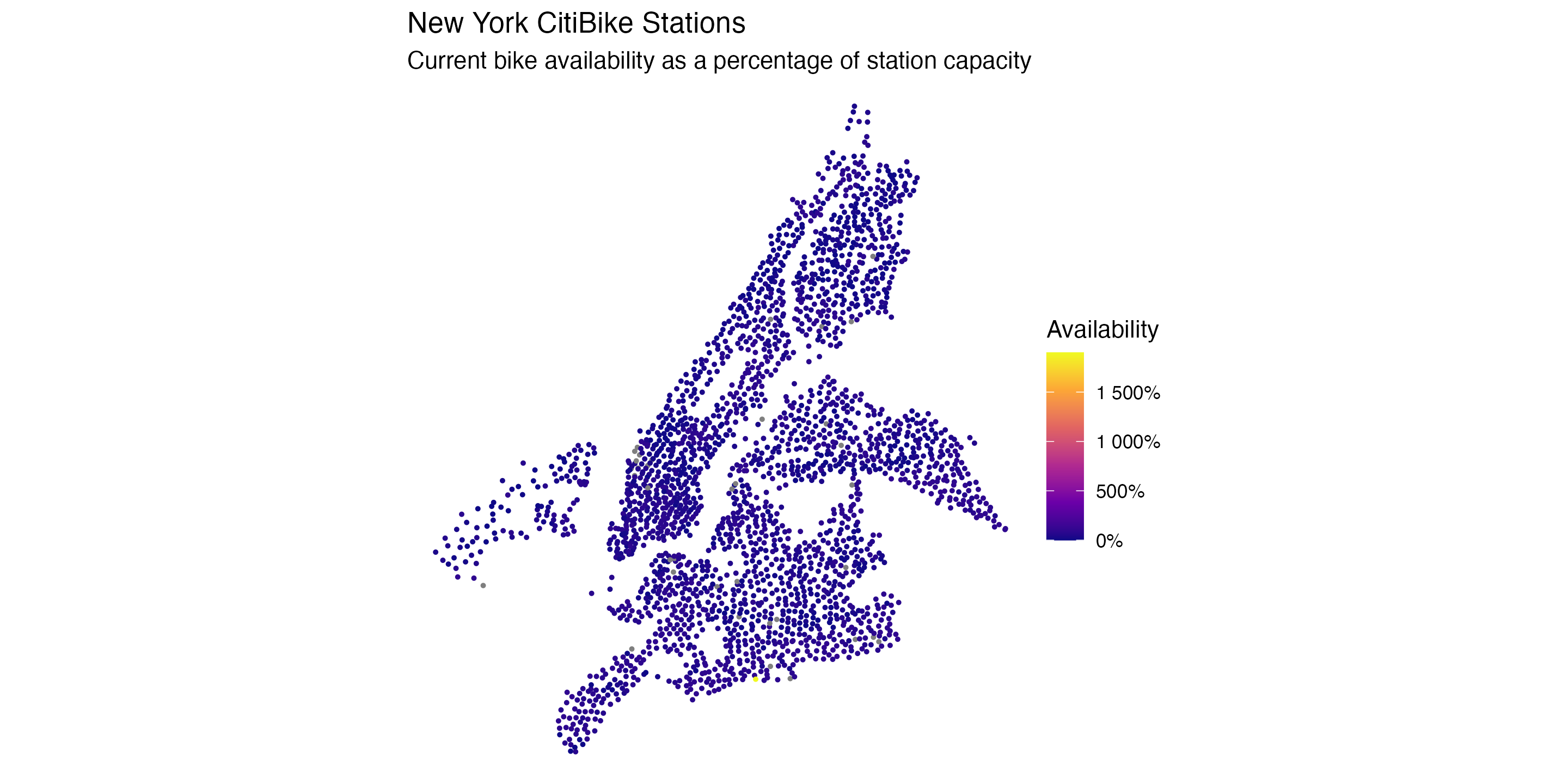
|> ggplot (aes (x = lon,y = lat,color = num_bikes_available/ capacity)) + geom_point (size = 0.5 ) + scale_color_viridis_c (option = "plasma" ,labels = scales:: percent_format ()) + coord_equal () + labs (color = "Availability" ,title = "New York CitiBike Stations" ,subtitle = "Current bike availability as a percentage of station capacity" ) + theme_void ()
NYC CitiBikes, a little more nicely
Make stations_df a proper spatial object with sf
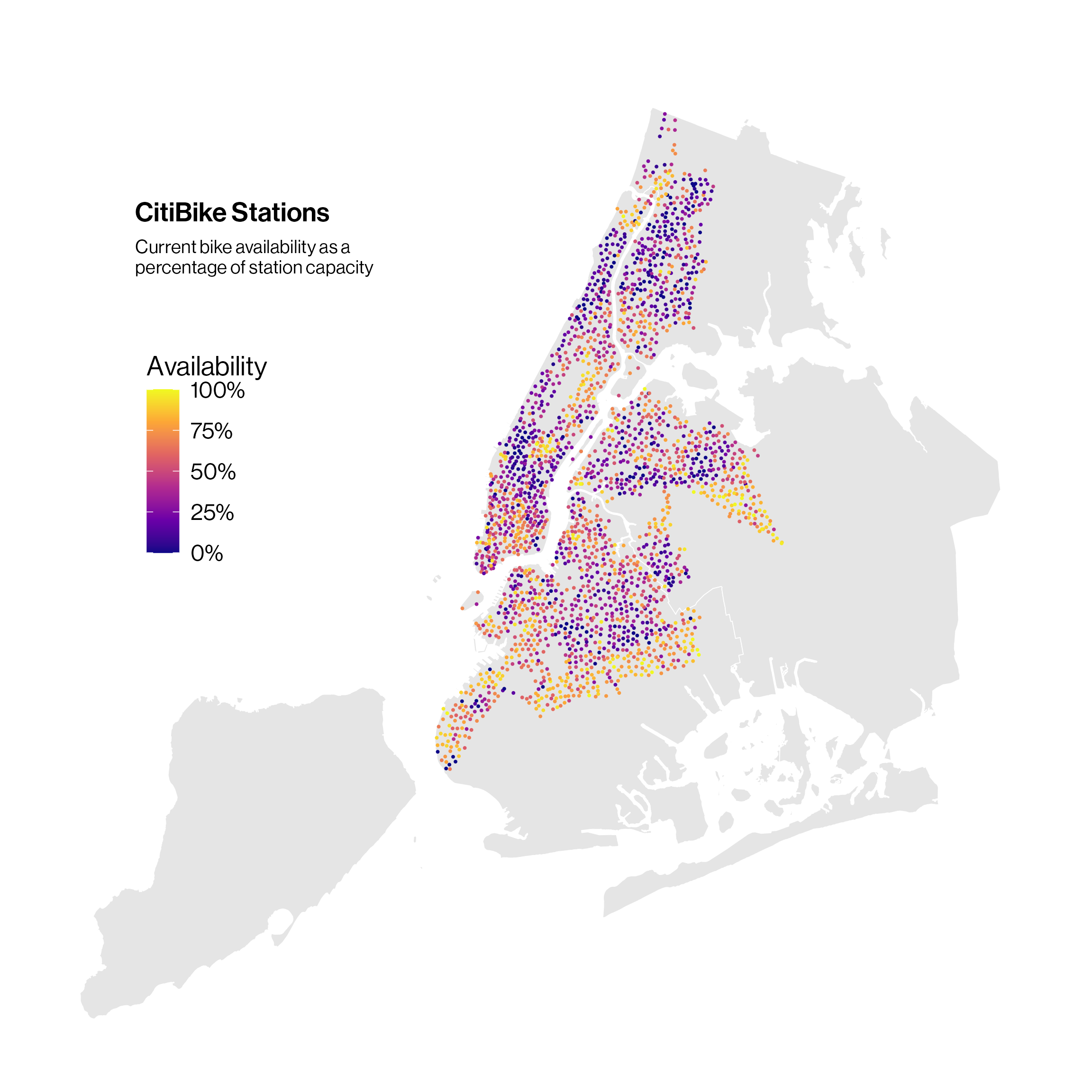
library (sf) # Simple features for spatial data library (nycmaps) # NYC map data library (nyc) # NYC map themes <- stations_df |> filter (capacity > 0 ) |> mutate (pct_avail = pmin (num_bikes_available / capacity, 1 )) |> st_as_sf (coords = c ("lon" , "lat" ), crs = 4326 ) |> st_transform (st_crs (nyc_boros_sf)) |> st_filter (nyc_boros_sf)
st_as_sf() turns the lon and lat columns into a point geometry, with 4326 the code for plain longitude/latitude.st_transform() puts the points in the same projection as the borough map.st_filter() keeps only the stations inside the five boroughs, dropping the ones in New Jersey.
NYC CitiBikes, a little more nicely
|> select (name, capacity, pct_avail, geometry)
Simple feature collection with 2375 features and 3 fields
Geometry type: POINT
Dimension:     XY
Bounding box:  xmin: 972927.1 ymin: 161969.3 xmax: 1030750 ymax: 271701.5
Projected CRS: NAD83 / New York Long Island (ftUS)
# A tibble: 2,375 × 4
   name                       capacity pct_avail                 geometry
   <chr>                         <int>     <dbl> <POINT [US_survey_foot]>
 1 Colonial Rd & 89 St              12     0.833      (973906.5 166086.7)
 2 Harrison St & Hudson St          39     0.769        (981754.9 201122)
 3 Boston Rd & Prospect Ave         19     0           (1012864 242868.2)
 4 Broadway & W 138 St              27     0.593      (997111.7 238691.8)
 5 Yellowstone Blvd & 68 Ave        16     0.75        (1026266 203923.6)
 6 Fort Hamilton Pkwy & 85 St       14     0.571      (977620.7 165506.1)
 7 Church Ave & Story St            23     0.696      (989502.7 173186.2)
 8 Westchester Ave & E 156 St       23     0.217       (1010489 237238.7)
 9 Amsterdam Ave & W 186 St         21     0.143       (1003945 249368.9)
10 W 160 St & Riverside Dr          27     0.185      (999026.3 244292.7)
# ℹ 2,365 more rows
The lat and lon columns are gone, replaced by a geometry column of points.
NYC CitiBikes, a little more nicely
Layer the stations on top of a borough map
<- ggplot () + geom_sf (data = nyc_boros_sf, fill = "gray90" , color = "white" ) + geom_sf (data = stations_sf,mapping = aes (color = pct_avail),size = 0.6 , shape = 16 ) + scale_color_viridis_c (option = "plasma" ,labels = scales:: percent_format ()) + labs (color = "Availability" ) + add_nycmap_title (title = "CitiBike Stations" ,subtitle = "Current bike availability as a \n percentage of station capacity" ,fig_height = 8 ) + theme_broadway_nycmap () + theme (legend.position.inside = c (0.1 , 0.72 ),legend.justification.inside = c (0 , 1 ))
NYC CitiBikes
Finally, the “last updated” tag is a good old Unix time number expressed in seconds since 1970:
as_datetime (feeds_df$ last_updated)[1 ] |> with_tz ("America/New_York" )
[1] "2026-10-20 08:30:57 EDT"